
AOMOSUR
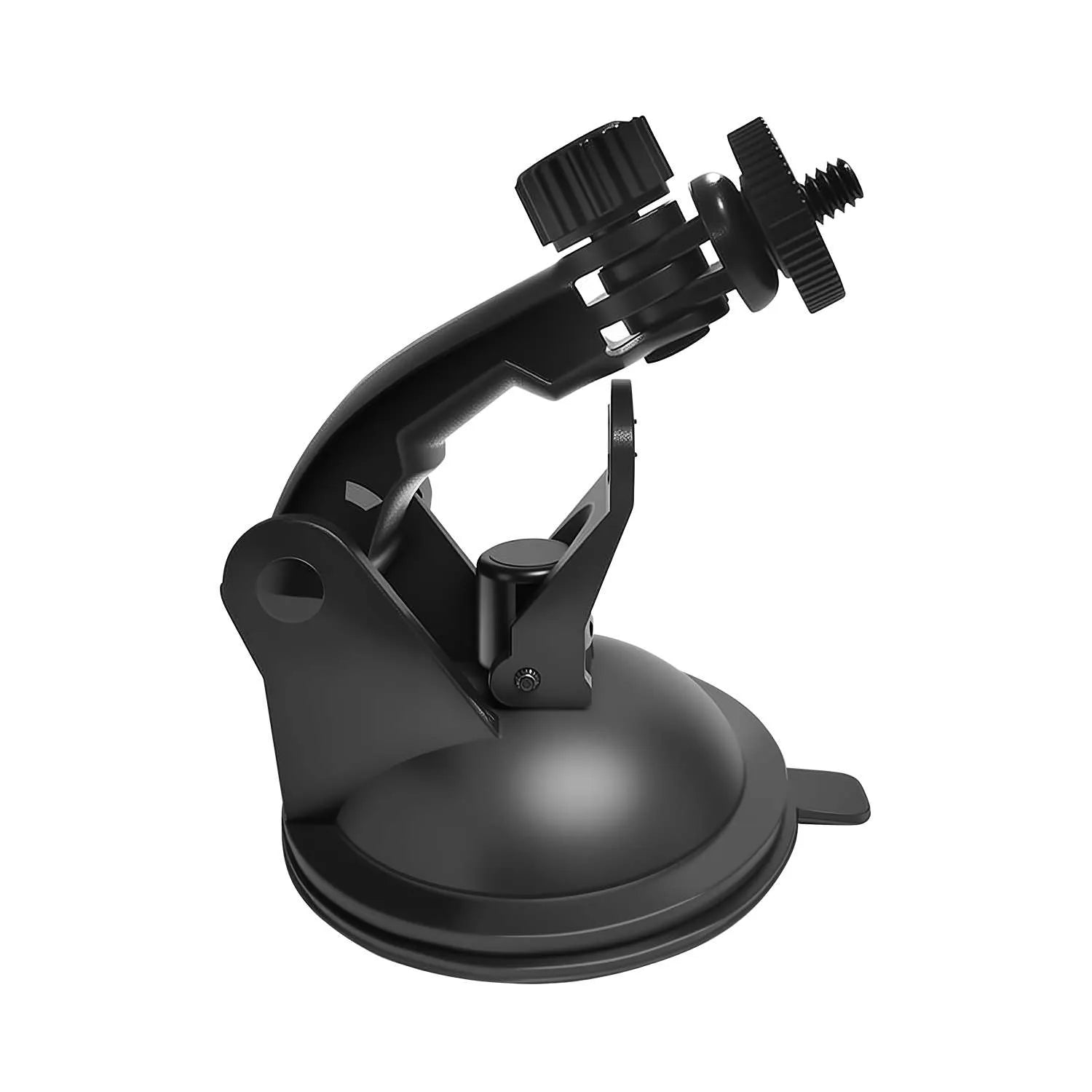
MTB02 Suction Cup Mounting Bracket for AM350 PRO Display
Secure, Adjustable Mounting for Your AM350 PRO Display
MTB02 is the dedicated suction-cup mounting bracket for the AOMOSUR AM350 PRO display. Its standard 1/4-inch screw, strong suction base and adjustable joint make it easy to position the screen on a windshield or another clean, smooth, nonporous surface.
- Designed for the AM350 PRO dedicated display
- Standard 1/4-inch threaded mounting screw
- Strong suction-cup base for smooth surfaces
- Adjustable tilt and rotation for a clear viewing angle
- Tool-free installation with no drilling
- Easy to remove, reposition or move between vehicles
Choose options
The MTB02 AM350 PRO display mount provides a simple and adjustable way to position your leveling monitor inside an RV, tow vehicle, truck, or camper.
Its strong suction cup base attaches to a clean windshield or another suitable smooth surface. Meanwhile, the adjustable arm and 1/4-inch mounting screw allow you to change the screen angle for clearer viewing.
No drilling or permanent installation is required. As a result, you can install, remove, or reposition the display whenever needed.
Designed for the AM350 PRO Display
The MTB02 is designed as a mounting accessory for the dedicated display included with the AM350 PRO wireless RV leveling system.
It helps keep the display:
- Easy to see from the driver’s seat
- Securely positioned during campsite setup
- Away from loose items on the dashboard
- Available for quick pitch and roll checks
- Positioned without occupying your smartphone holder
The bracket holds the display only. It does not include the AM350 PRO monitor, transmitter, or leveling system unless specifically stated in the package contents.
Standard 1/4-Inch Mounting Screw
The MTB02 uses a standard 1/4-inch threaded mounting screw to connect to the compatible display.
To install the display:
- Align the display mounting hole with the bracket screw.
- Turn the display or mounting screw until secure.
- Adjust the arm to the preferred viewing angle.
- Tighten the adjustment point before use.
Do not overtighten the screw, as excessive force may damage the display housing or mounting thread.
Strong Suction Cup Base
The suction cup base allows tool-free installation on suitable smooth surfaces.
Recommended surfaces include:
- Vehicle windshields
- Smooth glass
- Smooth dashboard mounting plates
- Flat, non-porous panels
- Other clean and smooth surfaces
For the best grip, clean and dry the surface before installation.
The suction cup may not attach securely to:
- Textured dashboards
- Curved surfaces
- Dusty or oily surfaces
- Soft-touch materials
- Fabric-covered panels
- Rough or porous surfaces
If your dashboard is textured, install the bracket on the windshield or use a suitable smooth mounting plate.
Adjustable Viewing Angle
The adjustable joint lets you position the AM350 PRO display for a more comfortable viewing angle.
You can tilt or rotate the holder to reduce:
- Screen glare
- Awkward viewing angles
- Reflections from the windshield
- Obstruction of the original dashboard
- The need to move the display by hand
After setting the angle, tighten the adjustment joint so the display remains stable.
Tool-Free Installation
The MTB02 does not normally require drilling, screws in the dashboard, or permanent adhesive.
Basic installation steps:
- Choose a suitable mounting position.
- Clean and dry the surface.
- Press the suction cup firmly against the surface.
- Lock the suction mechanism, if applicable.
- Attach the AM350 PRO display to the 1/4-inch screw.
- Adjust the display angle.
- Confirm that the bracket and screen are secure.
Check the mount before every trip or campsite setup.
Easy to Remove and Reposition
The suction cup design makes it easy to move the bracket between different locations or vehicles.
For example, you can:
- Move it between an RV and tow vehicle
- Reposition the display to reduce glare
- Remove it during long-term storage
- Take it down when parking in direct sunlight
- Change the display position for another driver
Before moving the bracket, release the suction mechanism instead of pulling the arm forcefully.
Suitable for RV and Vehicle Use
The MTB02 can be used in many vehicle interiors, including:
- Travel trailers
- Fifth wheels
- Motorhomes
- Camper vans
- Pickup trucks
- SUVs
- Tow vehicles
- Utility vehicles
Compatibility depends on the display’s mounting thread and the available installation surface.
Safe Installation Position
Install the bracket where the display remains easy to see without blocking the road.
Do not install it:
- In the driver’s direct line of sight
- Over an airbag cover
- Where it blocks the windshield
- Where it interferes with vehicle controls
- Where the display could fall onto pedals
- On a loose or unstable surface
After installation, gently test the bracket to confirm that the suction cup and display remain secure.
Why Choose the MTB02?
The MTB02 provides a practical mounting solution for AM350 PRO users who want a dedicated display in a clear and convenient position.
It offers:
- Direct compatibility with the AM350 PRO display
- Standard 1/4-inch mounting screw
- Adjustable viewing angle
- Strong suction cup mounting
- No drilling on suitable surfaces
- Quick removal and repositioning
- Compact and portable design
- Installation on windshields or smooth surfaces
For RV owners who frequently use the AM350 PRO from the driver’s seat, the MTB02 helps keep the display visible, organized, and ready for campsite leveling.
MTB02 specifications
Compatibility and installation details synchronized from the original AOMOSUR MTB02 listing.
Frequently asked questions
Answers synchronized from the original AOMOSUR MTB02 product page.
1. Is MTB02 compatible with the AM350 PRO display?
Yes. MTB02 is designed for the AM350 PRO dedicated display. Confirm that your display uses the standard 1/4-inch mounting interface before installation.
2. Does MTB02 include the AM350 PRO display?
No. The package contains the mounting bracket only. The display, transmitter and complete AM350 PRO system are sold separately.
3. What screw size does the mount use?
It uses a standard 1/4-inch threaded mounting screw. Tighten it securely, but do not overtighten.
4. Can I mount it on a windshield?
Yes. Install it on clean, smooth glass where it does not block your view, controls or airbags, and follow local windshield-mounting rules.
5. Can I mount it on a dashboard?
Yes, if the surface is flat, smooth, clean and nonporous. Textured, curved, soft-touch, dusty, oily or porous dashboards may not hold suction reliably.
6. Does installation require drilling?
No. Normal installation uses the suction cup and does not require drilling.
7. Does it use permanent adhesive?
The bracket itself uses suction. If a separate adhesive dashboard plate is supplied, the adhesive is used only for that plate.
8. Is the viewing angle adjustable?
Yes. Adjust the joint to aim the display, then tighten it so the screen remains stable.
9. Can the display rotate?
The adjustable joint supports repositioning and rotation. The exact range depends on the installation position and surrounding clearance.
10. How do I install the suction cup?
Clean and dry the surface, press the suction cup firmly into place, engage its lock, attach the display, adjust and tighten the joint, then check that the mount is secure.
11. Why does the suction cup fall off?
Common causes include dust or oil, a textured or curved surface, excessive heat, an unlocked base or a worn or damaged suction cup.
12. Can I move it between vehicles?
Yes. Release the suction lock, remove the bracket carefully, clean the new surface and reinstall it.
13. Can I leave it installed while driving?
Yes, when it is securely mounted. Check the suction and joint regularly, especially before long trips or on rough roads.
14. Will hot weather affect the suction cup?
High heat and direct sunlight can reduce suction over time. Check the mount regularly and reinstall it if the grip weakens.
15. Is MTB02 designed for outdoor use?
No. It is intended for protected vehicle-interior use. Do not expose it directly to rain, standing water or pressure washing.
16. Can it hold other devices with a 1/4-inch thread?
It may fit some compatible lightweight devices, but AOMOSUR guarantees compatibility only with the AM350 PRO display.
17. Will the bracket block the screen or buttons?
No when installed correctly. Position it so the display, controls and charging port remain visible and accessible.
18. How do I remove the suction cup safely?
Release the lock and gently lift the edge of the suction cup to break the seal. Do not pull it off by the mounting arm.
What’s included
Included components for the selected AOMOSUR product configuration.
- 1 × MTB02 Suction Cup Mounting Bracket
Need help with compatibility or installation?
Our support team can help you choose, install and use your AOMOSUR product.