
AOMOSUR
X300 OBD 3-in-1 Multifunctional Vehicle Gauge with GPS
OBD-II, GPS and Off-Road Data on One Dedicated Display
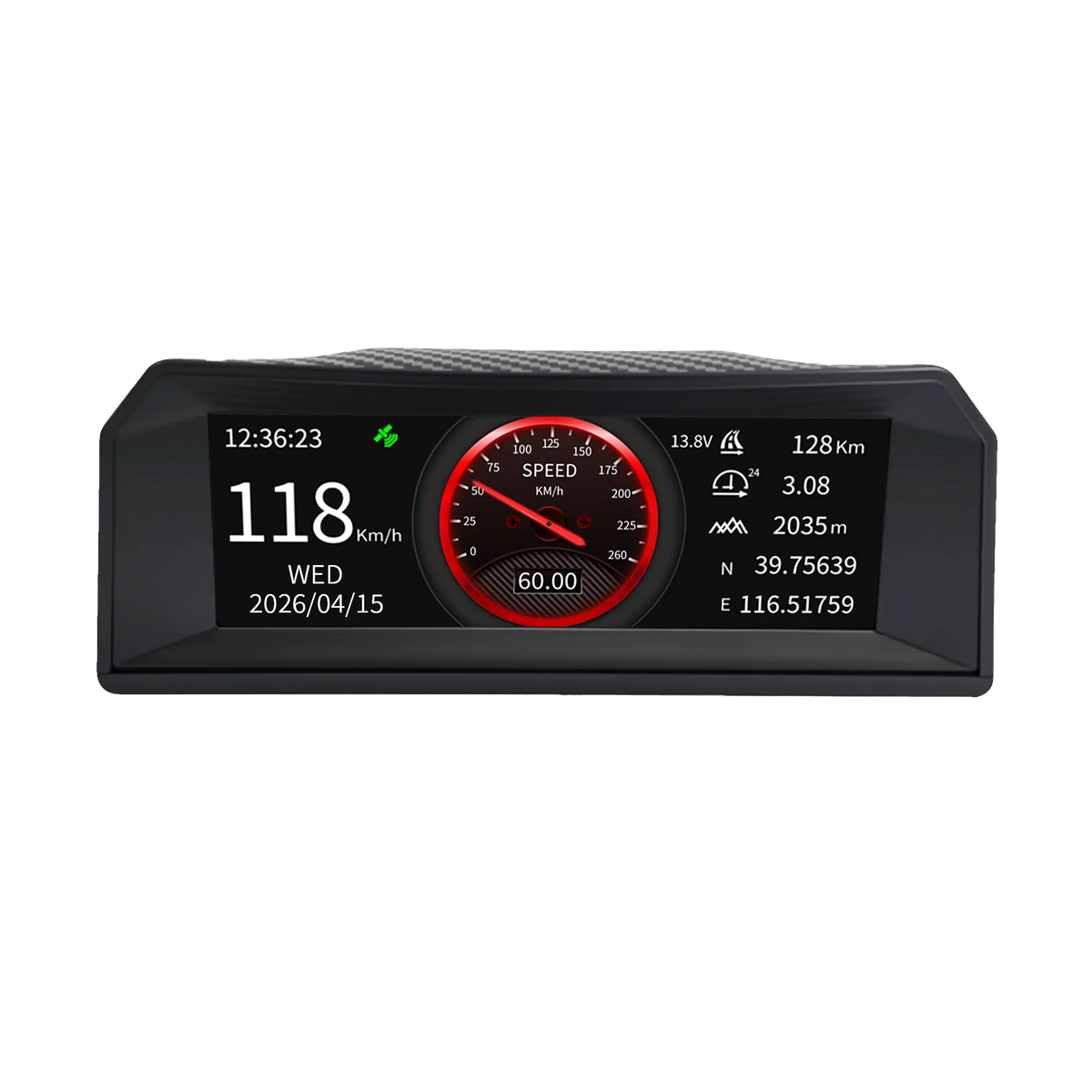
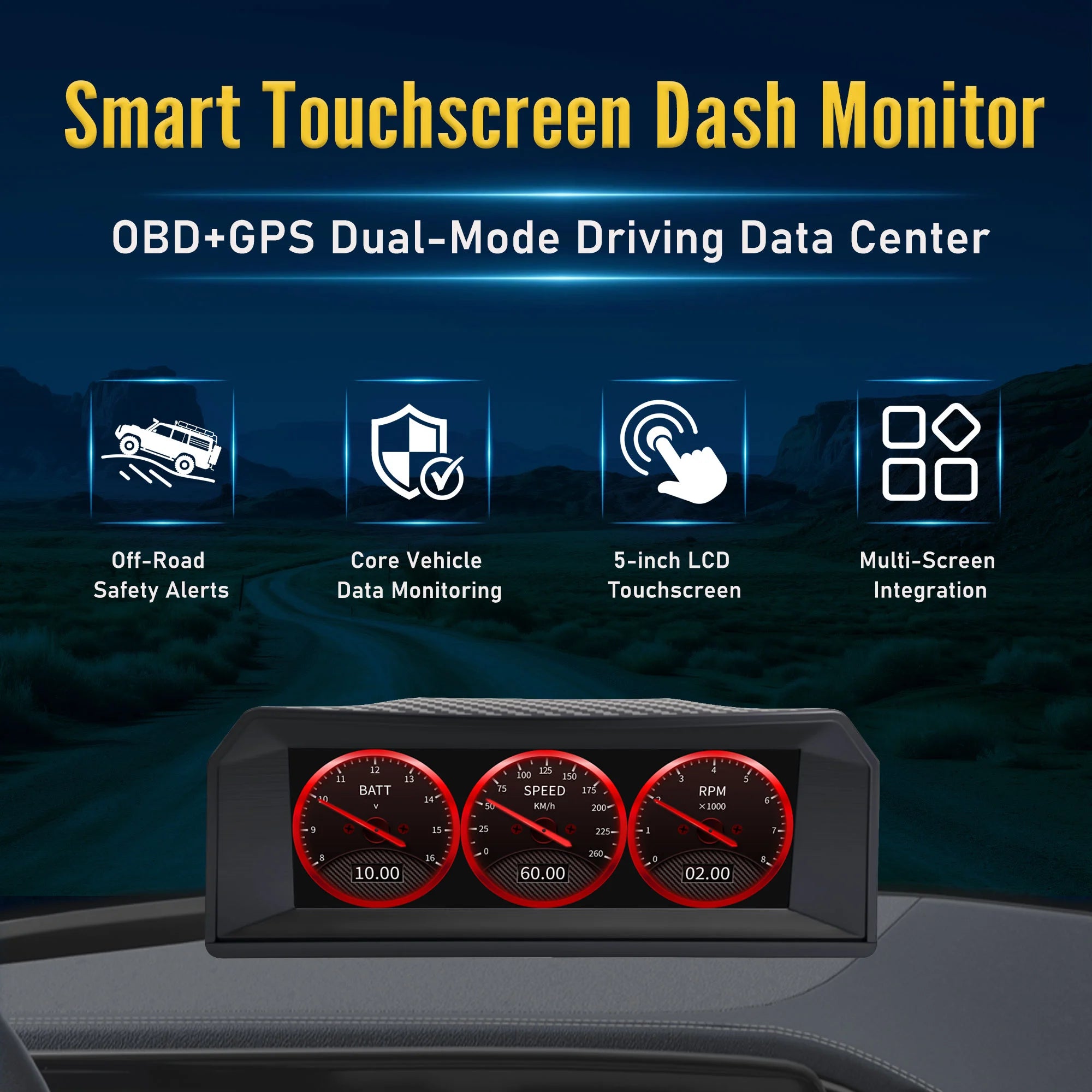
X300 connects to a compatible vehicle’s OBD-II port and combines real-time engine data, GPS + BeiDou positioning, pitch and roll readings, and a G-force display. Multiple screen modes keep essential driving information visible without using a phone.
- Live OBD-II data including RPM, speed, voltage, load and supported fuel and temperature parameters
- GPS + BeiDou speed and positioning information
- Off-road pitch and roll inclinometer
- Directional G-force display
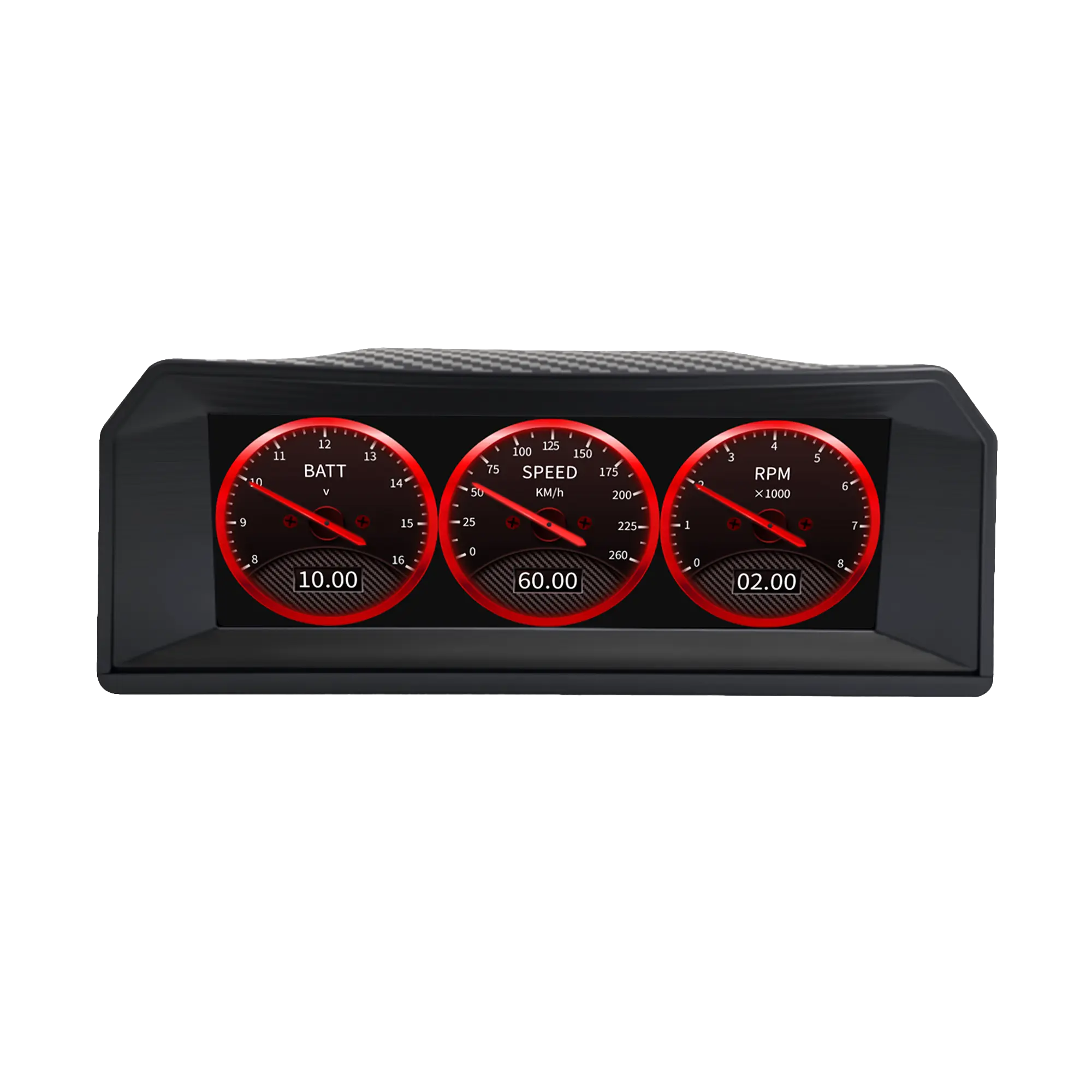
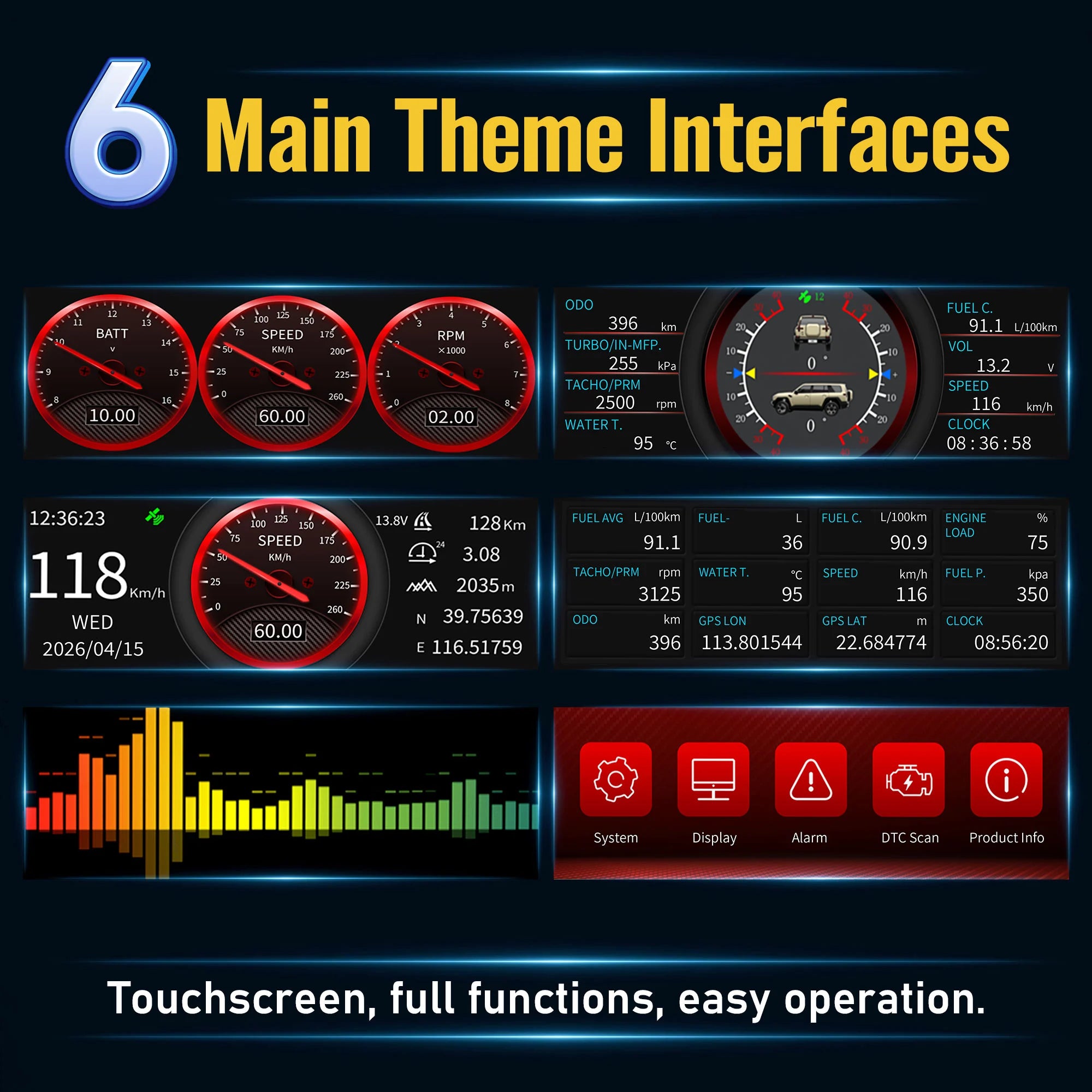
- OBD gauges, cruise, GPS, 12-grid, inclinometer and other customizable screens
- Swipe, double-tap and press-and-hold controls
- Designed for select compatible Toyota, Mitsubishi, Jeep Wrangler, Ford F-150 Raptor and other OBD-II vehicles
Compatibility note: Available data varies by vehicle, model year, ECU, OBD-II protocol and supported PID output.
Choose options
Monitor essential vehicle data, GPS speed, pitch, roll, and G-force on one dedicated display.
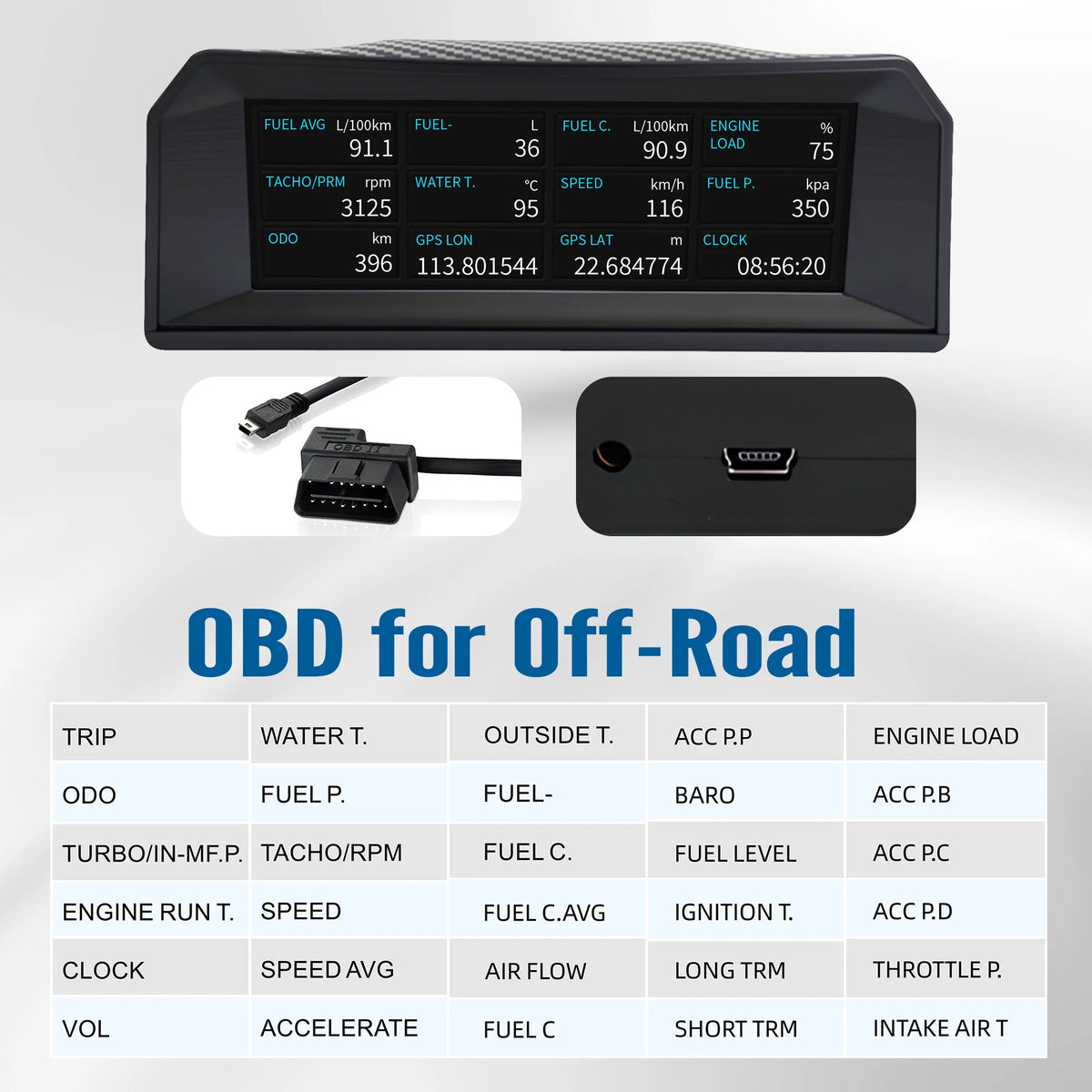
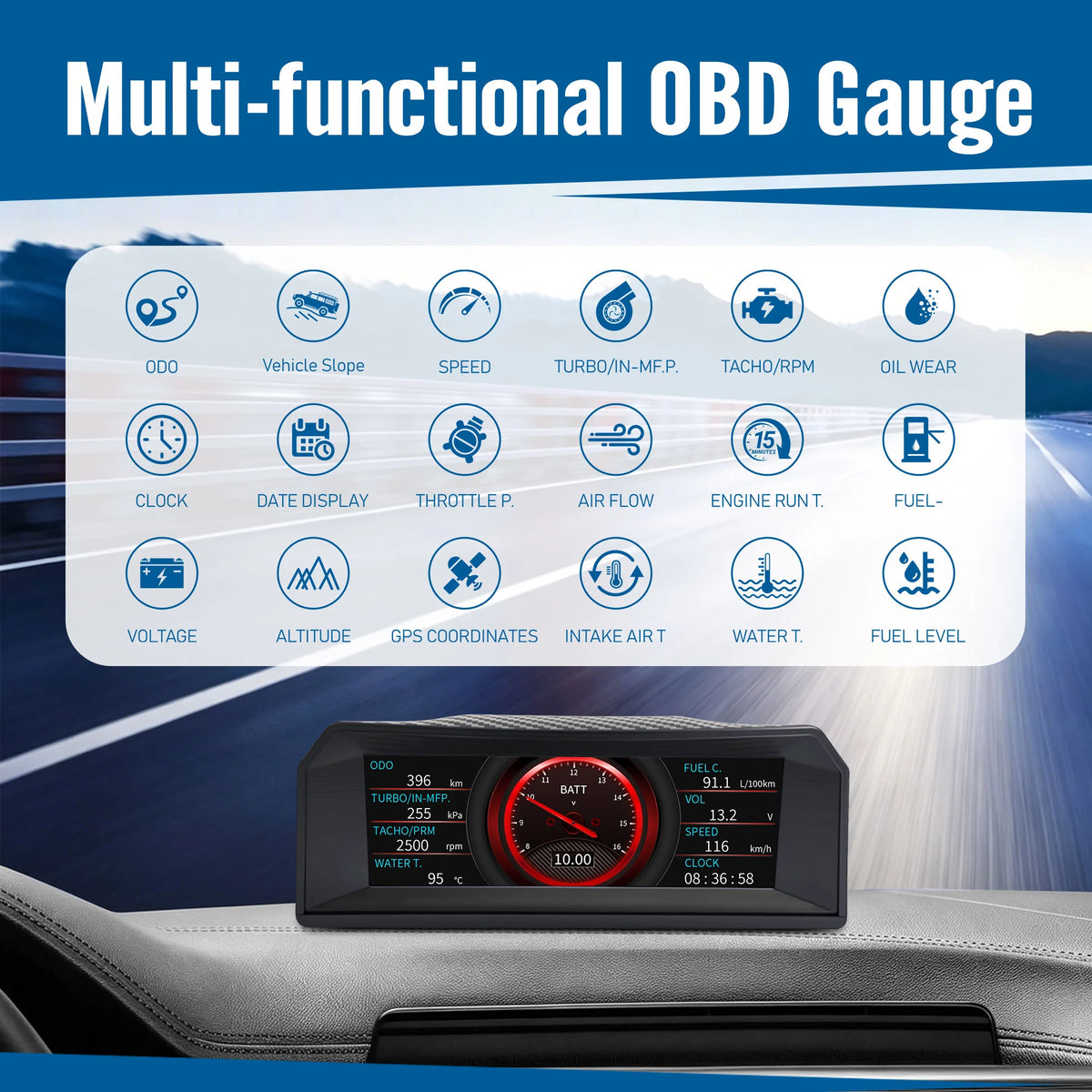
The X300 OBD2 gauge display connects directly to a compatible vehicle’s OBD-II port and provides real-time access to data such as RPM, vehicle speed, battery voltage, engine load, intake air temperature, fuel level, fuel rail pressure, and exhaust gas temperature.
With GPS + BeiDou positioning, multiple customizable display modes, an inclinometer, and a G-force meter, the X300 is designed for supported Toyota, Mitsubishi, Jeep Wrangler, Ford F-150 Raptor, and other compatible OBD-II off-road vehicles.
Key Benefits
- Real-Time OBD-II Data: Monitor RPM, speed, battery voltage, MAP, engine load, temperature, fuel-related data, and more.
- GPS + BeiDou Positioning: View GPS-based speed and positioning information.
- Off-Road Inclinometer: Monitor vehicle pitch and roll on uneven terrain.
- G-Force Display: View acceleration and directional force changes.
- Multiple Screen Modes: Switch between OBD gauges, GPS mode, cruise mode, inclinometer mode, and customizable data pages.
- Touch Controls: Swipe between screens and double tap compatible areas to change displayed data.
- Dedicated Display: Keep essential vehicle information visible without occupying your smartphone.
Displayed data varies by vehicle model, ECU configuration, OBD-II protocol, and supported PID output.
The X300 OBD2 gauge display combines real-time vehicle data, GPS-based driving information, off-road attitude monitoring, and customizable display modes in one compact screen.
Designed for supported off-road vehicles, pickups, SUVs, and performance-oriented vehicles, the X300 connects to the vehicle’s OBD-II port and displays available data directly from the vehicle’s electronic control system.
It is suitable for select Toyota, Mitsubishi, Jeep Wrangler, Ford F-150 Raptor, and other compatible OBD-II vehicles. Compatibility and available data depend on the specific vehicle, model year, ECU, protocol, and supported OBD-II PIDs.
Real-Time OBD-II Vehicle Data
The X300 displays multiple live vehicle parameters received through the OBD-II connection.
Depending on vehicle support, available data may include:
- Engine Speed — RPM
- Vehicle Speed — SPEED
- Battery Voltage — BATT
- Manifold Absolute Pressure — MAP
- Engine Load — LOAD
- Intake Air Temperature — IAT
- Fuel Level — FUEL LVL
- Fuel Rail Pressure — FRP
- Exhaust Gas Temperature — EGTS
The X300 also provides a multi-grid OBD data interface, allowing several supported parameters to be viewed on one screen.
Not every vehicle outputs every data item. Unsupported parameters may remain blank, unavailable, or display no valid reading.
Multiple OBD Display Modes
The X300 offers several ways to view vehicle information, allowing drivers to select the layout that best matches their needs.
Available interfaces shown in the product manual include:
- OBD triple-gauge mode
- Cruise display mode
- GPS mode
- 12-grid OBD data mode
- Audio spectrum display
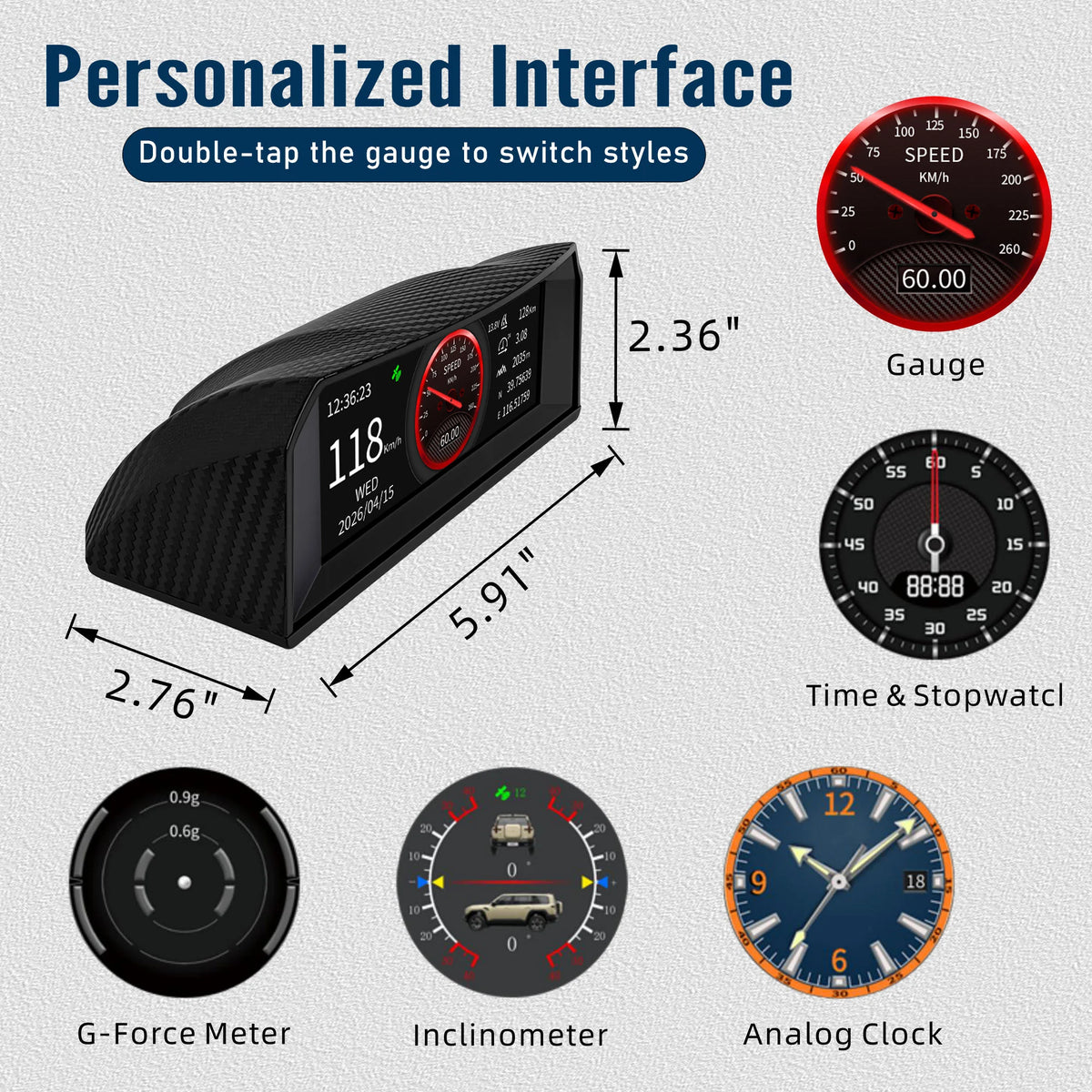
- Inclinometer display
- G-force display
Users can swipe between supported screens and double tap designated display areas to change certain data items.
This provides greater flexibility than a basic single-screen OBD monitor.
GPS + BeiDou Positioning
The X300 supports GPS and BeiDou satellite positioning for GPS-based driving information.
The positioning system can provide:
- GPS-based vehicle speed
- Positioning status
- Driving information independent of certain OBD speed data
- Additional reference information during long-distance and off-road travel
GPS signal reception may be affected by tunnels, underground parking areas, tall buildings, dense trees, weather conditions, and the installation position of the device.
For better satellite reception, install the display in a position with a relatively clear view toward the windshield and sky.
Real-Time Engine Data Monitoring
Through the vehicle’s OBD-II interface, the X300 helps drivers view supported engine and operating data in real time.
Depending on vehicle compatibility, this may include:
- Engine RPM
- Engine load
- Intake air temperature
- Battery voltage
- Fuel level
- Fuel rail pressure
- Exhaust gas temperature
- Manifold absolute pressure
This information can help drivers better understand vehicle operating conditions during:
- Towing
- Long-distance travel
- Heavy-load driving
- Hill climbing
- Overlanding
- Off-road driving
The X300 is a monitoring display. It does not replace professional diagnostic equipment, scheduled maintenance, or inspection by a qualified technician.
Important Note About OBD-II Diagnostics
The X300 supports real-time OBD-II vehicle data monitoring.
Unless your confirmed product manual specifically states that the device can read and clear diagnostic trouble codes, avoid describing it as a full OBD fault-code scanner.
A more accurate description is:
Real-time OBD-II engine and vehicle data monitoring.
Only add the following claims if the device has confirmed support for them:
- Reading diagnostic trouble codes
- Clearing diagnostic trouble codes
- Resetting warning lights
- Displaying code definitions
Off-Road Inclinometer
The integrated inclinometer displays vehicle pitch and roll information, making the X300 useful for off-road vehicles, pickups, SUVs, and overlanding applications.
The inclinometer can help users view the vehicle’s orientation while driving or stopping on uneven terrain.
According to the operating instructions, users can perform horizontal calibration by pressing and holding the center of the inclinometer screen for approximately three seconds.
Recalibration may be needed after:
- Moving the display
- Changing the mounting angle
- Reinstalling the device
- Moving the device to another vehicle
- Parking on a confirmed level surface
The inclinometer provides reference angle information only. It does not replace safe driving practices, terrain assessment, vehicle stability systems, or driver judgment.
G-Force Meter
The X300 also includes a G-force display for monitoring directional force changes during acceleration, braking, and cornering.
The G-force interface provides an additional visual reference for:
- Acceleration
- Braking
- Turning
- Uneven terrain
- Dynamic vehicle movement
Displayed values are intended as driving reference information and should not be treated as certified performance or safety measurements.
Swipe and Tap Controls
The X300 uses an interactive screen interface for convenient operation.
Depending on the active page, users can:
- Swipe to move between display modes
- Double tap compatible display areas to change data items
- Press and hold the inclinometer screen to perform horizontal calibration
- Select different layouts for OBD, GPS, and off-road information
This allows the driver to customize the display according to the vehicle and driving situation.
Easy OBD-II Installation
The X300 connects to a compatible vehicle through the included OBD-II cable.
Basic installation steps:
- Locate the vehicle’s OBD-II port.
- Connect the X300 OBD-II cable.
- Secure the display using the included mounting base.
- Start the vehicle.
- Allow the device to identify supported vehicle data.
- Select the preferred display mode.
- Confirm that the shown parameters are valid for the vehicle.
The OBD-II port is commonly located below the dashboard near the driver’s side, although its exact location varies by vehicle.
Vehicle Compatibility
The X300 is designed for supported OBD-II vehicles, including select:
- Toyota off-road models
- Mitsubishi off-road models
- Jeep Wrangler models
- Ford F-150 Raptor models
- Pickups
- SUVs
- Overlanding vehicles
- Other compatible OBD-II off-road vehicles
Compatibility should not be determined by brand name alone.
Before purchasing, confirm:
- Vehicle model
- Model year
- Fuel type
- OBD-II protocol
- Supported ECU data
- Available OBD-II PIDs
- Connector compatibility
Diesel, hybrid, electric, modified, imported, or region-specific vehicles may provide different data or have limited compatibility.
Why Choose the X300?
The X300 combines multiple useful driving displays in one compact device:
- Real-time OBD-II data
- GPS-based speed information
- GPS + BeiDou positioning
- Off-road pitch and roll monitoring
- G-force display
- Multiple customizable interfaces
- Dedicated screen operation
- Simple OBD-II installation
For drivers who want more information than a basic speedometer or single-function inclinometer, the X300 provides a practical way to view vehicle, GPS, and off-road data together.
X300 specifications
OBD-II, positioning and display specifications synchronized from the original AOMOSUR X300 listing.
Frequently asked questions
Compatibility, operation and installation answers synchronized from the original AOMOSUR X300 page.
1. What information does the X300 display?
X300 can display real-time OBD-II vehicle data, GPS speed, pitch, roll and G-force. Supported OBD data may include RPM, vehicle speed, battery voltage, manifold pressure, engine load, intake-air temperature, fuel level, fuel-rail pressure and exhaust-gas temperature.
2. Does the X300 support OBD-II diagnostics?
It supports real-time OBD-II vehicle and engine data monitoring. It displays supported operating parameters supplied by the vehicle’s ECU.
3. Can the X300 read and clear fault codes?
Only treat this as supported if it is specifically confirmed for the product’s manual and firmware version. Its primary listed purpose is real-time OBD-II data, GPS information and off-road angle monitoring.
4. Will every vehicle display all data items?
No. Available data depends on the ECU, model year, OBD-II protocol, fuel type and supported PIDs. Unsupported values may remain blank without indicating a product fault.
5. Is the X300 compatible with all OBD-II vehicles?
No. It is intended for supported Toyota, Mitsubishi, Jeep Wrangler, Ford F-150 Raptor and other compatible vehicles. Confirm the model, year, region, engine and ECU protocol before ordering.
6. Can I use the X300 in an off-road vehicle?
Yes, if the vehicle has a compatible OBD-II system. Its inclinometer, G-force, GPS and live vehicle data are useful for supported pickups, SUVs, overlanding vehicles and off-road models.
7. Does the X300 require a smartphone app?
No. X300 has its own dedicated display and does not require a smartphone app for normal operation.
8. Does it require an internet connection?
No. Vehicle data comes through OBD-II and positioning information comes from satellite signals. Mobile data, WiFi and cellular service are not required.
9. What is the inclinometer used for?
It shows pitch and roll as a visual reference on uneven terrain. It does not replace driver judgment or the vehicle’s safety systems.
10. How do I calibrate the inclinometer?
Park on a confirmed level surface, open the inclinometer screen, then press and hold its center for about three seconds. Recalibrate after changing the display angle or position.
11. What does the G-force display show?
It shows directional force changes from acceleration, braking, cornering and vehicle movement as a visual driving reference.
12. Does GPS speed work without OBD data?
Yes. GPS speed is calculated from satellite positioning. Reception can be reduced in tunnels, underground parking areas and other places without a clear view of the sky.
13. How do I switch between display modes?
Swipe across the screen to change supported pages. On compatible screens, double tap a data area to change the shown parameter; exact controls vary by mode.
14. Is installation difficult?
No. Connect the supplied cable to the vehicle’s OBD-II port, install the display on its mounting base and start the vehicle. The OBD-II port is commonly below the driver-side dashboard.
15. Can I leave the X300 connected all the time?
That depends on vehicle power behavior. Some OBD-II ports remain powered after shutdown; during long parking, confirm that X300 powers down or disconnect it to reduce battery drain.
16. Why is a data item blank or unavailable?
The vehicle may not output that OBD-II PID or the current ECU may not support it. Try another parameter and confirm compatibility before assuming a fault.
17. Can the X300 be used on diesel vehicles?
Compatibility depends on the diesel vehicle’s protocol, ECU, model year and supported parameters. Some readings may be available while others remain unsupported.
18. Does the X300 automatically level the vehicle?
No. It displays pitch and roll but does not operate leveling jacks, suspension, stabilizers or automatic leveling equipment.
19. Is the X300 currently available for purchase?
Yes. The active product is stocked and can be ordered through this store while inventory remains available.
What’s included
Included components for the selected AOMOSUR product configuration.
- 1 × X300 Main Display Unit
- 1 × OBD-II Connector
- 1 × Power Cable
- 1 × Mounting Base
- 1 × User Manual
Need help with compatibility or installation?
Our support team can help you choose, install and use your AOMOSUR product.